
How to Choose a Longer Laser Cutter for Your Business?
Choosing a Longer Laser Cutter is a practical business decision, not simply a search for the largest machine. A wider bed may handle full sheets, long signs, furniture panels, or repeated production runs. However, extra capacity can increase floor-space demands, power consumption, extraction requirements, and maintenance costs. Bigger is not always better.
In real workshops, the best choice begins with your daily materials and production rhythm. Measure the largest workpiece, including its edges and clamping space. Then check cutting thickness, laser power, positioning accuracy, working speed, and software compatibility. A machine that cuts slowly may appear affordable but create expensive delays during busy orders. Ask suppliers for sample results on your actual materials, not only polished catalog images.
Safety and reliability deserve equal attention. Review enclosure design, ventilation, emergency controls, grounding, warranty terms, spare-parts access, and technician support. Confirm whether the manufacturer provides clear manuals and operator training. These details often matter more after installation than during the purchase.
Some decisions will remain uncertain. Future orders may change. Your first capacity estimate may be wrong. That is normal. Leave practical room for growth, but avoid paying for unused space today. A careful comparison of machine capability, workflow fit, total ownership cost, and supplier credibility can protect your investment. The goal is not owning the most impressive cutter. It is building a dependable production system that earns its place every working day.
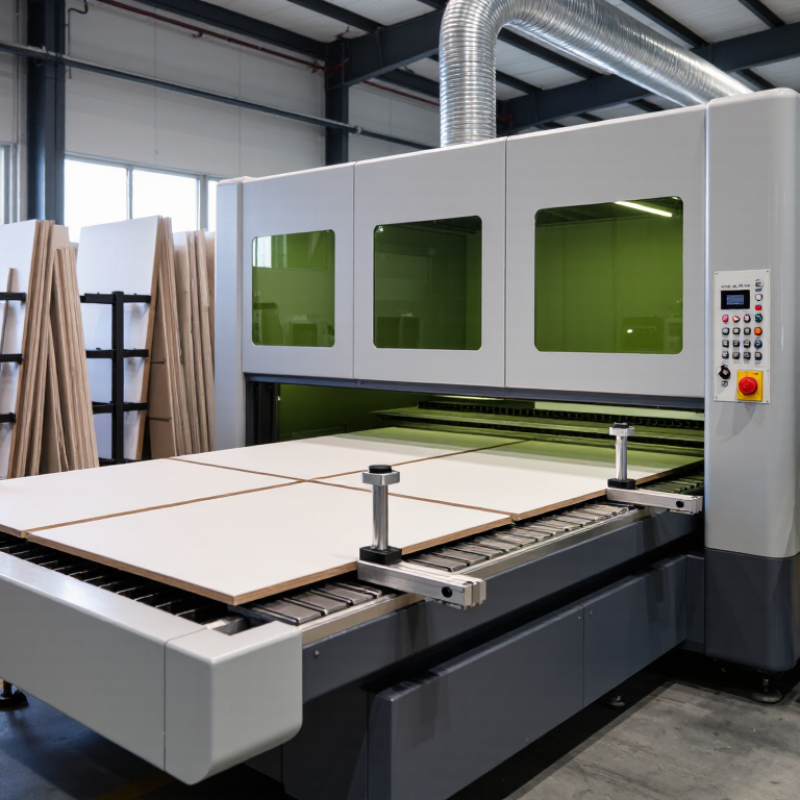
Table of Contents [Hide]
Define Long-Format Needs: Bed Sizes from 1500×3000 mm and Beyond
Choosing a longer laser cutter starts with the sheet, not the machine. A 1500×3000 mm bed suits standard full-size panels and reduces repeated repositioning. Larger beds may handle oversized furniture parts, signs, doors, or architectural components. Measure your real materials first.
Leave working clearance around every edge. A 1500×3000 mm sheet may need extra space for loading, clamps, ventilation, and operator access. Check the machine’s usable cutting area, not only its advertised bed size. Some frames reserve space for rails, sensors, or material supports. Small details matter.
I once underestimated loading space and created a slow, awkward workflow. The cutter fit, but the material handling did not. That mistake changed my planning method. I now mark the floor with the machine footprint, sheet path, and storage zones before requesting quotations. Test cuts on your thickest routine material can reveal focus limits, heat distortion, and edge quality. Ask for documented positioning accuracy, repeatability, maximum material weight, and maintenance access. A longer bed is not automatically better. It becomes valuable when it reduces joints, waste, handling time, and alignment errors. Review your monthly sheet sizes, not your biggest possible order. Keep some flexibility.
How to Choose a Longer Laser Cutter for Your Business? — Define Long-Format Needs: Bed Sizes from 1500 × 3000 mm and Beyond
| Bed Size | Usable Cutting Area | Typical Sheet or Workpiece Fit | Suitable Business Applications | Key Advantages | Planning Considerations |
|---|---|---|---|---|---|
| 1500 × 3000 mm 4.92 × 9.84 ft | Approximately 4.5 m² before allowances for clamps, edge clearance, and machine design. | Fits many standard 1500 × 3000 mm metal sheets and long architectural panels, subject to the machine's actual travel range. | Structural components, signage, architectural panels, metal fabrication, HVAC parts, and medium-volume production. | A practical long-format baseline with a strong balance between sheet utilization, production capacity, and factory footprint. | Confirm the actual effective cutting area rather than relying only on the nominal bed size. Allow space for loading and unloading. |
| 2000 × 4000 mm 6.56 × 13.12 ft High-capacity choice | Approximately 8.0 m² before process clearances and unused sheet margins. | Accommodates large-format sheets and long fabricated parts with fewer splits or repositioning steps. | Large signage, transport equipment parts, industrial enclosures, architectural metalwork, and high-throughput fabrication. | Reduces the need to divide long parts and can improve workflow continuity for large sheet layouts. | Requires more floor space, greater material-handling capacity, and a loading method suited to heavier or larger sheets. |
| 2000 × 6000 mm 6.56 × 19.69 ft | Approximately 12.0 m² before edge clearances and machine-specific limitations. | Designed for very long sheets, profiles, panels, and parts that would otherwise require multiple setups. | Long structural members, rail and transport components, large equipment panels, architectural fabrication, and contract cutting. | Supports exceptionally long workpieces and can reduce joints, repositioning, and alignment operations. | Verify transport access, crane or vacuum loading requirements, operator visibility, and the stability of long material during cutting. |
| 2500 × 6000 mm 8.20 × 19.69 ft | Approximately 15.0 m² before safety margins, clamping zones, and machine-specific allowances. | Suitable for oversized sheet layouts and wide, long panels where nesting efficiency is more important than compact equipment size. | Heavy fabrication, shipbuilding components, construction panels, large industrial covers, and specialized contract manufacturing. | Maximizes the opportunity to process wide and long parts in a single setup. | Check building access, foundation requirements, ventilation routing, service clearance, and the available space for finished-part staging. |
| 3000 × 12000 mm 9.84 × 39.37 ft Extra-long production | Approximately 36.0 m² before machine-specific exclusion zones and material margins. | Intended for extremely long sheets, rails, beams, and continuous production workflows rather than ordinary workshop jobs. | Large-scale steel service centers, heavy equipment manufacturing, long structural parts, and specialized industrial processing. | Minimizes part segmentation and enables production of exceptionally long components. | Requires a complete site assessment covering material supply, loading automation, operator safety, extraction, maintenance access, and logistics. |
| Custom or Pass-Through Format Length beyond standard beds | Determined by the fixed cutting zone, conveyor or shuttle system, and the maximum supported material length. | Useful when material is supplied from long coils, continuous stock, or sheets that exceed the fixed table length. | Repetitive long-part production, signage, decorative panels, tube or profile processing, and high-volume custom work. | Can extend production length without requiring an equally long stationary bed. | Review indexing accuracy, material support, maximum part weight, safety guarding, software compatibility, and the repeatability of each pass-through cycle. |
Selection rule: Choose a bed size based on the largest parts you regularly produce, not only on occasional oversized jobs. Always verify the effective cutting area, material thickness, loading method, machine footprint, ventilation requirements, and available handling equipment with the machine specification.